P6-11.1 Prompt Engineering That Adjusts Input Instructions, Context, and Examples
Section ID:
P6-11.1Version:v2026.07.31
When turning this Section into a practice record, separate user_goal, instruction, context, example, output_format, observed_response, and remaining_limit. Then problems that can be adjusted through prompt wording do not mix at the same level with problems that must move to search, tools, or evaluation structure.
In P6-10.2, we saw that alignment is not simply a problem of making friendly answers. It is a design problem involving helpfulness, safety, factuality, and service policy together. Now we need to look at the tool that users touch first.
How do users actually observe and adjust LLM behavior?
Prompt engineering is a practical method of designing inputs, observing model responses, and adjusting them more similar to the desired format and conditions.
Put more simply:
A prompt is the first adjustment point that tells the model what to answer and how to answer.
Work Handled by Input Design
- What does prompt engineering adjust?
- Why did prompts become the first tool in the LLM user experience?
- What kinds of instructions, context, and examples actually help?
The core point is that a prompt is input design for observing and adjusting the current model response. Chain-of-thought, self-consistency, and automatic prompt optimization are strategies that handle intermediate steps or candidate comparison at the prompt layer. The limits of prompts appear where current evidence and real execution structures are needed.
A prompt is not a magic spell. It is safer to read it as an input-design tool for observing and adjusting model behavior.
The prompt chapter is a transition section. After pretraining, fine-tuning, and alignment, it reads input design that users can adjust right now, checks its limits, and then moves to RAG and tool use. The question at this stage is how far the current model response can be changed through input design. Model weight adjustment remains in the fine-tuning layer, and latest-evidence connection and real-execution connection are handled again in RAG, tool use, and AI agent structures.
The first impression that should change here is not tips for writing good sentences, but the understanding that this is input design for observing and adjusting current model responses.
Separating Problems Solved by Input Design from Problems Passed to Structure
- You can explain prompt engineering at an introductory level.
- You can distinguish the roles of instruction, context, and example.
- You can say why prompts became the starting point for fast experiments and behavior observation.
- You can read prompt limits as
problems that do not settle with input design alone.
Many users who started using generative AI tools first felt through prompts that the same model can move differently depending on input design. So prompts are best read as the most direct control device that users meet before RAG, tool use, and AI agents.
This perspective matters for the following reasons.
- It lets us start observing behavior without knowing the full model structure.
- It connects to why input design remains important later in RAG, tool use, and AI agents.
- It also lets P6-11.2 separate the limits that prompts alone cannot solve.
The scenes to separate first are cases where an answer appears but length and format drift, cases where the same task keeps missing the reader level or tone, and cases where the answer is plausible but freshness or evidence feels unstable. In the first two cases, we can first ask what is missing among instruction, context, and example. By contrast, if the problem is latest documents, real evidence, or successful calculation, lookup, and execution, writing a more refined input sentence alone may not settle it.
With this distinction, prompt engineering can be read more directly as the first control point that separates problems to solve first in input design from problems requiring structural change, rather than as tips for good wording.
What Does a Prompt Change?
A prompt usually does not change the model's internal weights. It changes the input instead.
| Question | Short answer |
|---|---|
| What does the user change directly? | Input sentences and conditions |
| What is not changed yet? | Internal model weights |
| So what is the role of a prompt? | Input design that draws out the current model response better |
In other words, the user designs the following.
- What to ask the model to do
- What background information to provide together
- What format the answer should use
- What examples to show
A prompt does not retrain the model. It is input design that draws out how the current model responds.
From a service-structure perspective, the prompt is the innermost control point before external documents or external tools are attached.
What Changes Directly with Prompts and What Does Not Change Well
When first learning prompts, it is easy to feel that every problem can be solved by writing the input sentence well. But prompts clearly split into layers that change directly and layers that do not change well with prompts alone.
| What prompts first change well | What prompts alone do not change well |
|---|---|
| Answer length and format | Access to latest information |
| Explanation order and tone | External system lookup and execution |
| Output patterns following examples | Guaranteed calculation accuracy |
| Instructions to check scope and evidence | Complete long-term fixation of domain style |
Prompts are strong at changing how to draw out the current model response, but they do not replace information outside the model, execution structure, or persistent adaptation itself.
The same distinction can be summarized briefly as follows.
| Question to try first with a prompt | Question that does not settle with prompts alone |
|---|---|
| Can the answer become shorter, longer, or more structured? | Can the model actually read the latest document? |
| Can the same model's format drift be reduced? | Can calculation accuracy and execution success be guaranteed? |
| Can examples stabilize the response pattern? | Can long-term style fixation or persistent adaptation be finished? |
Once this summary is visible, the core of prompt limits is visible too. A prompt is the first control point for drawing out the current model response better, but it is not a means that guarantees structures beyond that limit.
Why Prompts Became the First Tool
The reason is very practical.
- They can be tried immediately.
- They cost relatively little.
- The model does not need to be retrained.
- Even after failure, they can be revised and observed again right away.
Prompt engineering was therefore the fastest experiment tool of the LLM era.
So many users first experience a model's character through prompts before understanding algorithms. This matters in the learning order too. Usage experience comes first, and theory follows afterward to explain why those responses appear.
Basic Elements of a Prompt
The three elements most often seen in practice and learning are the following.
| Element | Central question |
|---|---|
| Instruction | What are we asking the model to do? |
| Context | What background information or material is provided together? |
| Example | What input-output pattern is being shown? |
Once these three are separated, prompts become much less abstract.
A minimal flow for writing the same request more structurally can be seen as follows.
| Order | What the user decides |
|---|---|
| 1 | What to ask the model to do |
| 2 | What to provide as reference |
| 3 | What format the answer should use |
What Does an Instruction Decide?
An instruction decides the goal of the task.
For example:
Summarize this in three linesExplain it for the reader levelOrganize it in table format
Sentences like these tell the model what it should do.
What Does Context Decide?
Context decides the background and scope the model should refer to.
For example:
- Part of the original document
- Internal company policy
- Previous conversation content
- Term definitions
Without this information, the model is more likely to fill gaps with general patterns. Context is therefore closely related to accuracy.
What Does an Example Decide?
For example:
- A question-answer pair
- An input-classification label pair
- An original text-summary pair
These examples provide a form signal: answer in this way. This is why few-shot prompting feels useful.
In other words, an example is less a device for adding more content and more a device that shows which form and response pattern to follow. The result to check is whether adding an example makes the model follow not only simple content generation but also the requested format and response pattern more closely.
Prompt Engineering Is Also Observation Work
We need to hold this expression first so that prompt engineering is not read as simple sentence decoration, but as work that observes how outputs change when inputs change and finds failure patterns. More precisely, it is similar to a repeated experiment that:
- changes the input
- observes how the output changes
- finds failure patterns
- finds a more stable expression
Prompt engineering is a sense for sentences, but it is also a behavior observation experiment.
This matters because even when RAG or tool use is attached, the user still first needs to design what request to write and how to write it.
Prompts should be read in the main flow of Part 6 as the first practical control point users touch, and then connected to what structure is needed next.
The shortest structure to hold is prompt input adjustment -> RAG evidence connection -> tool use/AI agent execution structure. In prompt input adjustment, we ask what input draws out the desired format and scope better. In RAG, we ask what evidence should be attached when prompts alone are insufficient. In tool use and AI agent structures, we ask what performs execution that documents alone cannot handle and in what order. The prompt is responsible for input adjustment in this flow, and when its limits appear, evidence connection and execution structure need to be attached separately.
What should be kept first is an experiment memo and format-check statistics that show which input design was tried, which items were often missing from the answer, and where the format drifted. This record is needed so that P6-11.2 can recheck prompt limits, and so that the move to P6-12.1 evidence-connection judgment or P6-14.1 execution-need judgment does not become shaky. Later, this record is read again as evaluation standards in P6-16 and as review memos, execution logs, and improvement plans for Part 6.
Drawn Very Simply
flowchart TD
  A["instruction"]
  B["context"]
  C["examples"]
  D["prompt"]
  E["model response"]
  F["observe and revise"]

  A --> D
  B --> D
  C --> D
  D --> E
  E --> F
The key of this diagram is that a prompt is not a sentence written once and finished. It is work where observation and revision continue.
Cases and Examples
Case 1. Summarization Task
Imagine a user pasting a long meeting note and only writing summarize it. In that case, it is easy to expect the model to choose an appropriate length and focus by itself. But the model must infer length, tone, and importance standards on its own, so some answers may be too long and others may omit the core conclusion. Even for the same document, an executive-report summary and a practical handoff summary may need to keep different content.
What the human should do first is not find a smarter model, but clearly state how many lines, who the summary is for, and what should remain. The change here is a move from ending with the request summarize it to asking whether length, reader, and retention standards are specified. If we provide length and reader level together, as in summarize in three lines for the reader, output drift decreases. Otherwise, the content may be correct but too long for reporting and too sparse for handoff. The result to check in this case is whether output scope and format drift actually decrease when summary length, reader, and retention standards are specified, and whether the same document stably follows different structures by use case.
This case is a real work scene because even for the same meeting note, the standard for a good summary changes completely when the reader changes. Executives may want only decisions and risks quickly, while practitioners may need longer next actions and unresolved items. If this difference is not written in the prompt, the model leans on a general summary pattern. Then on one day the conclusion appears first, on another day the background becomes long, and on another day essential action items are missing. The core of the summarization case is not writing a more impressive sentence, but first fixing in the input what to discard and what to keep.
Comparing what should be written first when the same meeting note is used for different purposes makes the point clearer.
| Same source document | What drifts with only vague summarize it | What the prompt should specify first |
|---|---|---|
| Meeting memo for executive reporting | Background explanation may grow long and the conclusion may move back | Line count, decision focus, retaining risk items |
| Work memo for handoff | Decisions may remain, but next actions and owners may disappear | Reader, slots to keep, priority on follow-up work |
| Notice draft for customers | Internal terms and undecided information may be mixed in | External reader standard, public scope, tone |
The key of this comparison is that summary quality is not determined only by model performance. The misunderstanding to correct is that if the document is the same, a good summary is mostly one thing. In reality, if the reader and purpose change, the information structure to keep changes first.
Case 2. Classification Task
Consider a support classification task where only labels such as refund, shipping, account, and error are provided. If the label names are intuitive, it is easy to expect the model to understand the boundaries similarly. But even people can interpret the boundaries differently if they only see label names. For example, a sentence such as The delivery is late, so I want a refund contains both shipping and refund, making it ambiguous which label should be prioritized.
When input examples and label examples are provided together, the model reads the pattern send this kind of sentence to this label more stably. Without examples, similar inquiries may go to different queues on different days and disturb operating order. The change here is a move from assuming label names are enough to asking whether examples that show label boundaries are needed. In a classification case, prompts do not create the correct answer from nothing. They make label interpretation boundaries clearer. The result to check in this case is whether similar inquiries collect into the same queue more consistently after adding input examples and label examples than when only label names are provided, and whether priorities drift less in boundary cases.
This case also attaches directly to operation. Inquiry classification is not simply a game of guessing label names. It routes requests of the same nature into the same handling flow. If label boundaries are not clearly defined in the input, both the model and human reviewers can easily use different standards. If one day refund request due to shipping delay goes to shipping and the next day to refund, the downstream handling team and SLA both drift. So what matters in a classification prompt is not a polished explanation, but fixing where to place boundary cases through examples.
In practice, inquiries like the following especially reveal the level of prompt design.
| Boundary inquiry scene | Likely drift when only label names exist | What examples should fix first |
|---|---|---|
The delivery is late, so I want a refund | Priority drifts between shipping and refund | Primary priority label for compound inquiries |
I cannot log in, so I cannot cancel my order | Routing differs between account and refund | Whether to prioritize failure cause or business result |
An error appears, and payment did not go through | Boundary drifts between error and payment/refund | System-error priority rule and follow-up queue movement |
What matters in this table is that examples are not simple explanatory supplements. They are devices that place operating rules into the model input. The standard to hold is that the label name is intuitive and all boundary cases stably go to the same queue are different problems.
Case 3. Document-Based Question Answering
Suppose a user asks in document-based question answering, Under this policy, can family members also be registered? It is easy to expect that if the question itself is specific enough, the answer will stay within that scope. But if only the question is given, the model may mix in general knowledge about welfare systems, increasing the risk of going outside the actual document.
What the human should do first is not ask more verbosely, but provide the relevant policy paragraph and give context: answer only within this scope. If a format condition is added, such as quote the evidence sentence first, then interpret it briefly, the response structure also becomes more stable. Otherwise, the model can give a plausible general answer that differs from the actual internal policy.
The change here is a move from writing the question well is enough to asking whether the document scope and evidence format that should bind the answer are provided together. Then the response is tied more closely to the attached document scope than to general knowledge. The result to check in this case is whether adding the relevant paragraph and evidence format makes the answer stay more similar to the actual document scope than general knowledge, and whether the answer avoids unnecessary expansion beyond the evidence sentence.
In document-based question answering, the role of the prompt is less finding the document itself and more fixing how the attached document should be read. For example, even with the same policy paragraph, just answer may make the model omit evidence and provide only a conclusion, while write the evidence sentence first and then interpret it changes the answer structure. So this case does not mean that prompts solve everything. It shows that even when documents already exist, input design still changes the result structure greatly.
The three cases can be grouped again from the input-design perspective.
| Situation | What drifts with only a vague request | What should be specified first in the prompt |
|---|---|---|
| Summarization task | Length, reader, key items to keep | Line count, target reader, importance standard |
| Classification task | Label boundary and priority | Label examples, boundary cases |
| Document-based QA | Answer scope and evidence limits | Reference paragraph, quotation method, interpretation scope |
The three cases can be compressed further as follows.
flowchart LR
  A["vague request<br/>summarize / classify / answer"]
  B["unstable output<br/>length / label boundary / evidence scope"]
  C["structured prompt<br/>instruction + context + examples"]
  D["steadier response<br/>format / scope / pattern held"]

  A --> B --> C --> D
The key is not more elaborate sentences, but finding what must be specified to reduce drift.
Scenes That Input Design Can Reduce First
When revising prompts, the most common missed distinction is treating writing a longer sentence and fixing the drifting standard first as the same thing. In practice, separating which slot the current result drifts in matters more than decorating the expression.
| Observed drift | Prompt element to fix first | Why this should be handled first |
|---|---|---|
| Format and length drift before factual content | Task instruction | If the core problem is output shape, not latest documents or execution, fixing the input instruction first is more appropriate before adding other structures. |
| Summary length varies and reader level does not fit | Task instruction | Line count and audience must be fixed first for length and tone to stabilize together |
| Classification results appear, but labels change on boundary cases | Example | Label-name descriptions alone weakly define boundary priority, so compound examples hold the judgment boundary |
| Document QA leaks into general knowledge | Context | Reference paragraphs and answer scope must be bound before refining the question reduces expansion beyond evidence |
The same table becomes clearer when rewritten as practical questions.
| If this scene appears | Question to ask first |
|---|---|
| The answer is mostly correct but keeps drifting in shape | Is the needed change a new structure, or clearer input instructions? |
| The answer is too long or too short | Did we write enough about what format to leave, beyond what to do? |
| Similar inquiries go to different labels | Did we show boundary cases as examples? |
| Unsupported explanation gets mixed in | Did we actually put the document scope the model should reference into the input? |
The first standard to learn is simple. Prompt engineering is not a technique for making sentences more plausible. It is input design that finds which slot among task instruction, context, and example is empty and causing result drift, then fills that slot.
Exercise and Example
The goal of this example is not to write one good sentence, but to directly observe which prompt produces more stable results when the same task is repeatedly applied to several request cards. In real services too, prompt evaluation matters less as one impressive output and more as whether format and core items keep holding across many inputs.
This example does not use a human-made response function. It reads a stored log format used for observing model responses. p6_10_1_generate_prompt_response_log.py actually calls an Ollama local model, reduces the raw response in the order raw model response -> format signals and core-keyword preservation -> CSV observation record, and saves it. The basic manuscript example reads a CSV log that has already been run. This CSV is a snapshot log made from a specific model, setting, and run time. Since execution results can differ by model and version, the point to read in the manuscript is not one particular sentence, but how the check statistics differ across task-only prompt, instruction and context prompt, prompt with examples, and prompt with examples and a check instruction.
Suppose a customer-support team summarizes several operations notes briefly every day. A simple request allows free summarization, but items that must be kept for operation may disappear. When instruction and context are given, the reader, line count, and required items become clearer. When an example is added, the model sees more directly what shape of answer to follow.
The example below compares stored response logs for four prompt types over four operations notes. The comparison standards are repeated responses by note, line count, numbered format, core-item preservation rate, missing slots, and overall summary statistics by prompt type. When the generation script is run, English prompts are sent to the Ollama local model, and responses are saved with the same CSV columns. The stored logs include log_source, model_name, temperature, and slot_language columns so that the execution environment can be checked. In the manuscript, we first read the already-run CSV log for a reproducible reading flow.
The prompt-design differences can be seen first in the following table.
| Comparison item | Task-only prompt | Instruction + context prompt | Instruction + context + example prompt | Instruction + context + example + check prompt |
|---|---|---|---|---|
| Task instruction | Summarize this | Three-line summary for an operations owner | Keeps the same instruction | Keeps the same instruction |
| Context | Only the operations note | Operations note and reader purpose are included | Keeps the same context | Keeps the same context |
| Example | None | None | Has a three-line slot output example | Has the same example |
| Additional control | None | None | None | Has no-introduction and core-fact check instructions |
| Check standard | Human eyeballing | Checks line count, slots, keyword preservation | Repeated comparison with the same standards | Repeated comparison with the same standards |
The key point to check in the code is that as instruction, context, and examples are added to the input, not only answer content but also format checkability and fact preservation may change together. Even if temperature is lowered to 0, model responses are not completely fixed calculation results, so we need to look at statistics across several cards and repeated logs rather than one result.
The stored response log is in p6-10-1-prompt-response-log.csv. One row is one model-response observation record. The core columns are prompt_type, card_name, log_source, model_name, temperature, line_count, numbered_lines, slot_count, keyword_hits, keyword_total, and missing_slots. response_note does not replace the full raw response. It leaves a short observation memo about which format signals appeared. This log is an execution snapshot made by calling llama3.2:latest with temperature=0.2, and the generation script uses English prompts and English slot names to keep the same execution standard in translations.
If we isolate only the Ollama call section, the structure is as follows. The default manuscript execution reads the stored CSV, but real model validation repeatedly sends the same operations note to the four prompt types and saves the raw response reduced into the same observation columns.
This call runs only in an environment where the Ollama server and model are ready. The example fixed in the manuscript below reads the stored CSV to reproduce the same observation structure without a server.
1 2 3 4 5 6 7 8 9 10 11 12 13 14 15 16 17 18 19 20 21 22 23 24 25 26 27 28 29 30 31 32 33 34 35 36 37 38 39 40 41 42 43 44 45 46 47 48 49 50 51 52 53 54 55 56 57 58 59 60 61 62 63 64 65 66 67 68 69 70 71 72 73 74 75 76 77 78 79 80 81 82 83 84 85 86 87 88 89 90 91 92 93 94 95 96 97 98 99 100 101 102 103 104 105 106 107 108 109 110 | |
The aggregate result of this execution snapshot can be read as follows.
When the same stored log is shown as a chart, we can see which items stabilize first as input elements are added. The simple prompt preserved some core keywords, but almost never produced numbered format or required slots. With instruction and context, slot names appeared stably, but the model often added an introductory sentence before the answer and broke the exactly three lines condition. With examples, the numbered format and slots stabilized. With examples plus the check instruction, this snapshot showed higher core-keyword preservation. In other words, examples can strongly fix output shape, and check instructions can make the model review facts that must not be omitted.
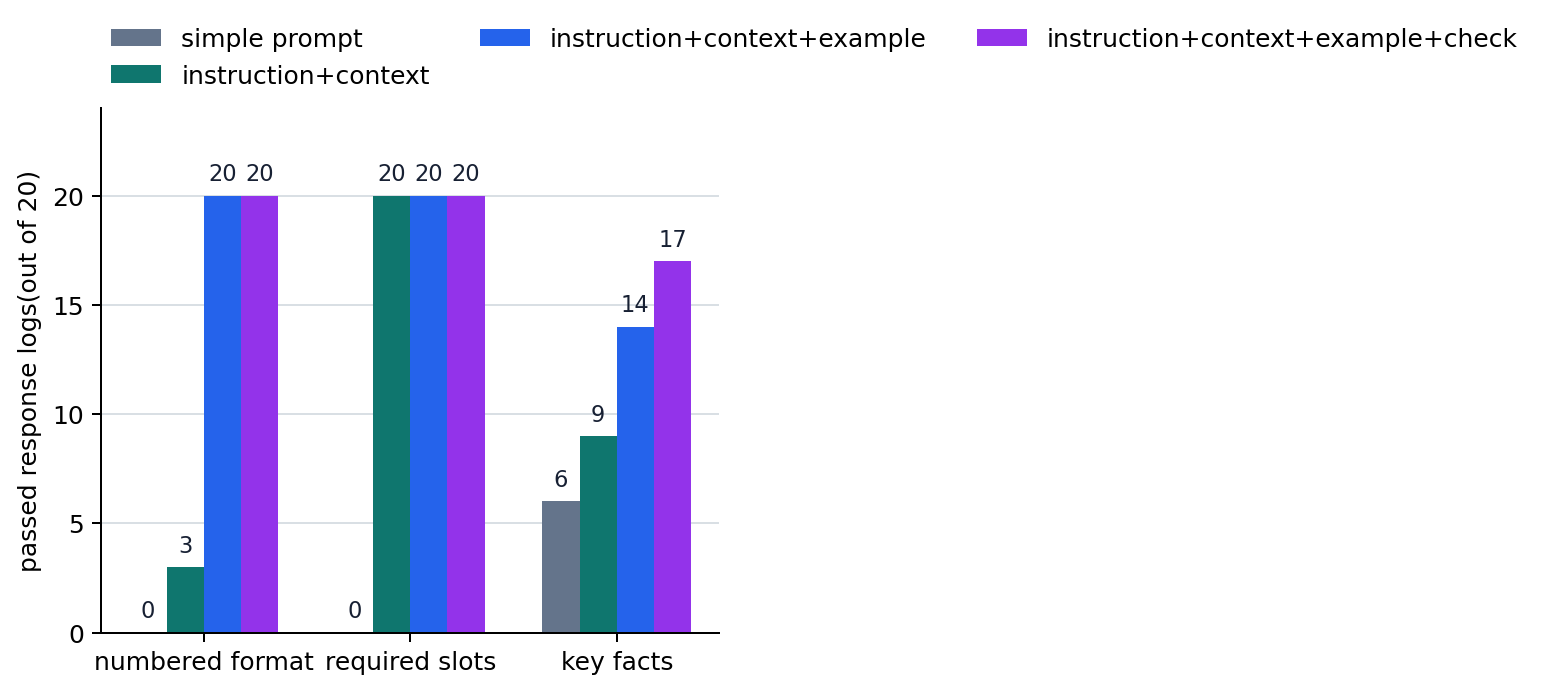
The key when reading this result is not adding a check instruction always makes things perfect. In this snapshot, the instruction + context + example + check prompt had the highest overall core-keyword preservation count, but for the refund backlog card, the prompt with examples only preserved better. Conversely, the instruction + context prompt often failed by adding an unnecessary introductory sentence before the format, but it still produced slot names stably. Here, core keyword is not a deep semantic score. It is a simple observation standard checking whether specified strings remained in the response. So if there are items that must not be omitted, we should experiment with additional controls such as required keywords, rewrite if missing, and check then retry, and check those controls again across several notes.
So the results to check in this example are twofold.
- As instruction, context, examples, and check instructions are added, observe how
line count,numbered format, andslot preservationchange across several request cards and repeated responses. - Even if format stability improves, core-item preservation is not automatically solved, so prompt experiments should check both
format stabilityandcontent preservation rate.
Readers can directly adjust this example in the following ways.
- Add a new slot such as
customer_impactto the CSV and make theslot_countstandard stricter. - Change the
format_ok_countstandard fromline_count == 3toline_count <= 3. - Change the summary standard to look first at average keyword preservation rate instead of
full_keyword_keep_count.
If Ollama is installed and a local model is available, readers can send the same request cards to the actual model again and make a new log. In that case, run something like OLLAMA_MODEL=model_name .venv/bin/python docs/assets/part-06/chapter-10/p6_10_1_generate_prompt_response_log.py. The prompts sent to the model are written in English to keep the same execution standard in translations. After creating a new CSV, rerun the manuscript code and p6_10_1_prompt_structure_chart.py so that the stored log and chart are compared with the same standard. It is better to store the raw response again as observation columns like the CSV above than to fix the raw response itself in the manuscript. Since real-time call results differ by model and version, the manuscript compares changes in format_ok_count, slot_ok_count, full_keyword_keep_count, and average_keyword_ratio rather than a particular sentence. The stored CSV is a snapshot from this execution condition, so the numbers can change if readers rerun it.
This verification method matters because prompt engineering is not about one good example, but about whether the same standard can be observed again. When running directly, the flow is as follows.
| Step | What to check |
|---|---|
| Generate Ollama logs | Are the same operations notes and four prompt types sent to the model again? |
| Store CSV observation columns | Was the raw response reduced into comparable columns such as line count, slot count, and keyword preservation rate? |
| Aggregate and regenerate chart | Can input-element differences be compared again with the same metrics even when model or temperature changes? |
The core to read here in this example is as follows.
- A simple prompt is a state where
only the task was stated. - An instruction + context prompt is a state where
task, reader, slots, and check standardwere provided together. - An instruction + context + example prompt is a state where
the output pattern to followwas also shown. - An instruction + context + example + check prompt is a state where
conditions to check before outputwere also attached. - Therefore, prompt engineering is more similar to
repeatable input design and check designthan to a competition for beautiful sentences.
Input Design Changed by Prompts
What matters in this comparison is not how long the sentence is, but which slots the model should use for judgment. If run directly with Ollama, the same numbers may not be fixed every time. So in this Section, comparing the stored log's format_ok_count, slot_ok_count, full_keyword_keep_count, and average_keyword_ratio matters more than appreciating one raw response. Prompt engineering is not looking at one model output. It is changing the input, leaving an observation record, and using that record to decide the next revision.
Checklist
- Can you explain prompts not as
wording tips, but asinput design and behavior observation experiments? - Can you distinguish what instruction, context, and example each change first?
- Are you ready to read P6-11.2 as the stage that finds
failures that input adjustment alone cannot settle?
Sources and References
- Tom B. Brown et al., Language Models are Few-Shot Learners, arXiv, 2020, accessed 2026-07-19.
- Jason Wei et al., Chain-of-Thought Prompting Elicits Reasoning in Large Language Models, arXiv, 2022, accessed 2026-07-19.
- OpenAI, Prompting | ChatGPT Learn, accessed 2026-07-19.
- Ollama, API Introduction, accessed 2026-07-22.
- Ollama, Quickstart, accessed 2026-07-22.