P6-13.1 Vector Databases That Store Embeddings, Source Text, and Metadata Together
Section ID:
P6-13.1Version:v2026.07.26
In P6-12.2, we saw that retrieval results are attached to the input context before generation. Now the question moves to what storage structure that retrieval actually runs on.
A vector database is a system that stores embedding vectors together with the source text and metadata connected to them, and helps find similar vectors quickly.
Retrieval Storage Structure Job
The core questions are these.
- Why store vectors instead of searching only raw text?
- What does a vector database store, and what does it return?
- Why do vector databases appear so often in RAG structures?
The first issue to close is why embeddings, source text, and metadata are stored together, not only text. A vector database is not a new kind of magic storage. It is a RAG retrieval storage structure that handles embeddings, source text, and metadata together so retrieved documents can be reused before generation.
If P6-12.2 looked at where retrieved documents are attached before answering, this Section looks at what storage structure makes those documents retrievable. Then P6-13.2 looks at which indexes and retrieval-quality standards narrow the stored candidates. Actual lookup or execution beyond document retrieval is handled later in the tool-use sections.
Separating vector, source text, and metadata storage
To understand a vector database, we need to separate the stored values. An embedding is a numeric representation for finding similar documents. A document chunk is the source text the generation stage will actually reread. Metadata is information such as source, version, date, and category, used to choose and verify candidates. These three need to be read together to understand why ordinary keyword search is not enough in RAG, and why P6-13.2 continues into indexes and retrieval quality.
The first scenes to separate can be summarized like this.
| First obstacle | First question to ask | Why this question comes first |
|---|---|---|
| The document seems to exist, but the question wording and document wording do not match. | Does a paragraph with the same meaning appear as a vector candidate rather than only by keyword? | Retrieval cannot even start if related paragraphs are not recovered when wording differs. |
| A related paragraph seems to be found, but there is no evidence sentence to attach to the answer. | Does the returned result include the source text chunk? | Generation must rewrite actual sentences, not numeric vectors. |
| The paragraph seems right, but we cannot tell whether it is current or which document it came from. | Do date, version, and source metadata return together? | Even visible candidates are hard to use operationally if source and freshness cannot be checked. |
| Several candidates appear, but it is hard to narrow which one fits best. | Are category and document ID attached as selection criteria? | When semantic similarity is ambiguous, metadata can become the final selection criterion. |
Using this table, a vector database is easier to read not as a place that stores only vectors, but as a storage structure that returns source text and metadata together so the result can be reused immediately after retrieval.
Why store vectors?
As we saw in the previous Section, RAG first finds related documents. But questions and documents do not always use the same words.
For example, a user may ask:
Has the refund standard changed?
while the document may say:
Return processing period change
In this case, simple keyword search can miss the document, but a method that finds semantically similar expressions near each other in vector space can help.
In short, a vector database helps a service manage turning sentences into numeric vectors and quickly finding semantically close items.
What a vector database stores
A common misunderstanding is does it store only vectors? In practice, these are usually stored together.
- Embedding vector
- Source text or document chunk
- Document ID
- Metadata such as title, date, and source
So it is better to view a vector database not as a lonely pile of numeric vectors, but as connected storage that can retrieve source text again after search.
What it returns
When a question is embedded and searched, the system usually returns these values.
- Nearby vector entries
- Document chunks connected to those entries
- Similarity scores
- Metadata
The RAG pipeline then attaches these results back to the prompt context and passes them to generation.
Why it appears often in RAG
RAG has the structure question -> retrieve related documents -> generate. If retrieval is semantic, the system needs a layer that efficiently handles vector storage and similarity search.
A vector database plays the role of a practical storage layer for the retrieval stage in RAG.
Its role is not to replace the model. Its role is to help the model find documents to refer to.
How it differs from a regular database
We should first grasp the role difference, not start with a strict comparison.
| Storage view | Central question |
|---|---|
| Regular database | How do we find exactly matching keys, fields, and conditions? |
| Vector database | How do we find semantically similar items nearby? |
Actual services often use both together. For example:
- user ID or date filters can use ordinary field search
- semantically similar document retrieval can use vector search
These can be combined.
Vector databases are not universal solutions
This point prevents us from mixing a vector database was added with retrieval-quality problems are automatically solved.
Having a vector database does not automatically solve:
- always finding the most relevant document
- automatically excluding old documents
- fixing poorly chunked documents by itself
The vector storage structure matters, but how documents are chunked, how metadata is attached, and which embedding model is used still matter as well.
A minimal diagram
flowchart TD
  A["text chunk"]
  B["embedding vector"]
  C["vector database"]
  D["nearest matching chunks"]

  A --> B
  B --> C
  C --> D
The point of this diagram is that text is first converted into vectors, and retrieval happens in that vector store.
Cases and examples
Case 1. Internal wiki search
Imagine an internal wiki where a user asks, Where do I return the company laptop before leaving? It is natural to first look for a document that literally contains laptop return. But the actual document titles may be Offboarding Procedure, Asset Collection Guide, or Exit Checklist, and the key sentence may be inside the body: IT assets are collected at the security team desk. Even if the question says return and the document says only collect, the business flow is practically the same. If we search only keywords, the user may think there is no document, even though the wording is different and the procedure is the same.
The standard changes from looking for the same word to asking whether a paragraph with the same meaning appears as a candidate. A vector database stores questions and document chunks as meaning-based vectors, making it easier to raise related paragraphs despite wording differences. The misunderstanding to correct is the feeling that different wording means a different procedure. The result to check in this case is whether the collection paragraph appears as a candidate even without the word return, and whether source metadata is attached so it can be passed to generation.
Case 2. Product manual search
Suppose a product manual user asks, I want to return settings to the initial state. With string search alone, the system may first look for documents containing initial state or return. But the actual manual may mix terms such as factory reset, restore settings, and restart after reset, and the menu path may appear only in one table cell. For example, retrieval may find only an overview paragraph and miss the paragraph containing the actual button sequence. Then the user remains in the state of the reset feature seems to exist, but I still do not know what to click.
The standard changes from asking are the expressions similar to asking whether the procedural paragraph actually needed by the user appears as a candidate. A vector database places these document chunks close by meaning, so related candidates can be gathered more evenly even when wording differs. The misunderstanding to correct is the expectation that if the overview was found, the procedure was found too. The result to check is whether the paragraph with the actual button sequence appears along with the overview, and whether location or category metadata returns with it.
Case 3. Developer documentation support
Suppose a developer asks, Is there an option to wait briefly and retry when rate limits occur? It is easy to assume that search requires knowing the exact function or option name. But the question does not contain the exact name, and the actual paragraph may be about retry or backoff. For example, the document may mention only exponential backoff and max_retries, while the question is written out as wait briefly and send again. Keyword search alone may fail to raise the related paragraph when the option name is missing from the question.
The standard changes from asking does the user know the exact option name to asking whether semantically close API explanations appear as candidates. A vector database stores the question and document chunks by meaning, making the related API explanation easier to bring up. The misunderstanding to correct is the judgment that if I do not know the exact option name, search is almost impossible. The result to check is whether retry or backoff paragraphs appear even without the exact option name, and whether version and source metadata return together so the generation stage can use them immediately.
The three cases can be summarized by retrieval standard.
| Situation | What string search can easily miss | What vector search tries to retrieve |
|---|---|---|
| Internal wiki search | A same-workflow paragraph where return and collect use different wording | The offboarding procedure paragraph with the same meaning |
| Product manual search | The actual button-sequence paragraph hidden behind an overview | The core procedure paragraph needed to perform the task |
| Developer documentation support | Retry or backoff API explanation when the question has no exact name | Semantically close option and behavior explanation paragraphs |
The same content can be reread from a storage-structure view.
flowchart LR
  A["text chunk"]
  B["embedding vector"]
  C["metadata<br/>source / category / version"]
  D["vector database record"]
  E["retrieval payload<br/>text + metadata"]

  A --> D
  B --> D
  C --> D
  D --> E
The key point is not storing vectors separately. It is treating text and metadata as connected records so the generation stage can reuse them immediately after retrieval.
When a retrieval result can become evidence
A common misunderstanding when first reading vector databases is remembering only the one-line description find similar sentences, without connecting why source text and metadata must be attached. But in real RAG inspection, did we find a nearby vector matters alongside did the result include source text and source information that can be used immediately.
For a retrieval result to move into generation as evidence, at least three values need to be visible.
| Value to inspect in retrieval result | Why it is needed as evidence |
|---|---|
| Similarity score and candidate rank | We need to decide which chunk to read first and which chunk to keep as a supporting candidate. |
| Source text chunk | Generation must answer by attaching actual sentences, not numeric vectors. |
| Source, version, status, category | We need to check whether the candidate is current, where it came from, and what filters can apply. |
The standard to learn first is simple. A vector database is a place that finds similar vectors, and at the same time a retrieval storage structure that returns source text and metadata together so the result can move to the next RAG stage.
Exercise and example
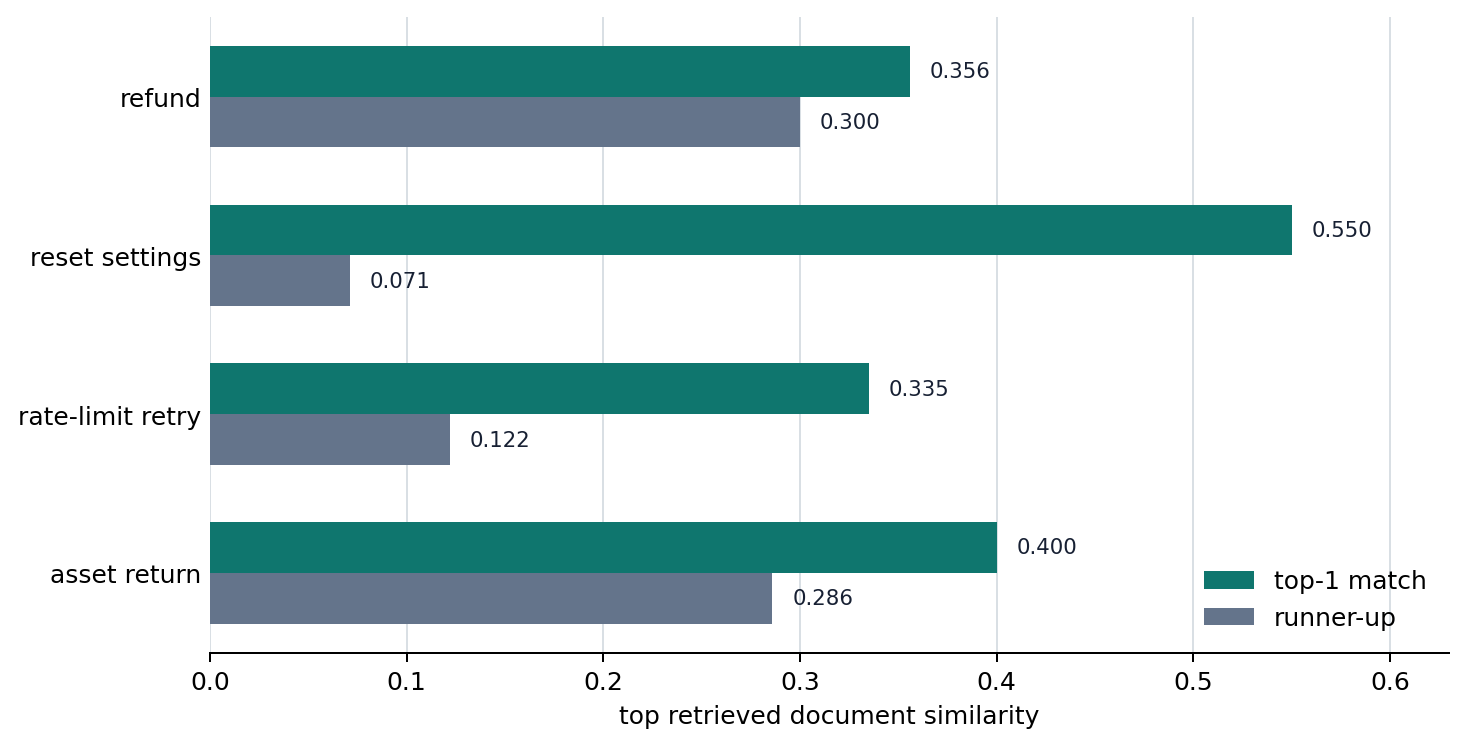
The goal of this example is not to implement a full vector database engine. It is to visually confirm that vectors, source text, and metadata are stored together and retrieved again by similarity to the question vector. We run several questions at once, such as refund policy, settings menu, SDK rate limits, and equipment return. Then we compare how the same storage structure returns different chunks and metadata for different questions, and how those results become retrieval payloads that can be passed to generation.
Document chunks need more than numeric vectors. They need source text and source information together. When a question arrives, the system finds chunks close to the question vector. After retrieval, it must pass source text and metadata together to the generation stage. Therefore, not only which item is the top candidate, but also which source and category come with it matters.
The example below uses the document-chunk CSV p6-12-vector-db-documents-en.csv and the question CSV p6-12-vector-db-queries-en.csv. One row in the document file behaves like one record in retrieval storage: document ID, title, source text chunk, source, category, version, and status. One row in the question file is one user question. In the output, we inspect similarity scores by question, top candidate chunks, the source text and metadata retrieved after search, and the retrieval payload passed to generation.
The first inspection points are these.
| Inspection item | Why it is needed |
|---|---|
| How do top-k candidate ranks and similarities change? | To see which document chunks are read first when the question changes. |
| Does the returned result include source text? | The generation stage must be able to attach actual sentences. |
| Does the returned result include metadata? | It is needed for citation, date filters, and version filters. |
| Which values are included in the payload bundle? | To check whether the retrieval result is enough evidence for generation. |
The key point in the code is that a vector database can serve as RAG evidence storage only if it returns source text and metadata along with similar sentences. The example uses an in-memory ChromaDB collection. To avoid making an external embedding-model download the focus, documents and questions are vectorized with TF-IDF, and those vectors are inserted directly into a Chroma collection for search.
1 2 3 4 5 6 7 8 9 10 11 12 13 14 15 16 17 18 19 20 21 22 23 24 25 26 27 28 29 30 31 32 33 34 35 36 37 38 39 40 41 42 43 44 45 46 47 48 49 50 51 52 53 54 55 56 57 58 59 60 61 62 63 64 65 66 67 68 69 70 71 72 73 74 75 76 77 78 79 80 81 82 83 84 85 86 87 88 89 90 91 92 93 94 95 96 97 98 99 100 101 102 103 104 105 106 107 108 109 110 111 112 113 114 115 116 117 118 119 120 121 122 123 124 125 126 127 128 129 130 131 | |
Example output can be read like this.
The first point to notice is that returned_top1_categories changes by question, and that payload_has_text_count and payload_has_metadata_count are both 4. In other words, a vector database should not be read as returning only one nearby numeric item. It should be read as a layer that raises different chunks to top-1 for different questions and returns source text plus metadata that the generation stage can use immediately.
The same result can be summarized by retrieval scene.
| Question | Retrieval character first visible | Why read it this way | What generation can use immediately |
|---|---|---|---|
refund_current | Refund policy retrieval | A refund category chunk rises to top-1 and a support response chunk follows as the next candidate. | Refund processing-period sentence and source |
settings_reset | Manual retrieval | The reset procedure rises to top-1 and the archive status remains in metadata. | Reset procedure sentence and version status |
api_retry | SDK guide retrieval | The rate-limit retry document rises to top-1 with API category and SDK version. | Retry-option explanation and SDK source |
offboarding_asset | Internal wiki retrieval | The laptop-return question raises an asset-return paragraph to top-1 and a checklist from the same category follows. | Asset-return sentence and HR wiki source |
So this example should leave two results.
- The storage does not keep only embedding numbers. It stores and retrieves source text and metadata that generation can reuse after search.
- Even with the same storage structure, changing the question vector changes the top chunks, sources, and categories together, so a vector database is not just numeric storage but a
question-specific evidence return layer.
The reader can directly adjust the example in these ways.
- Change the
questionwording in the question CSV and see how top documents and similarity scores change. - Add a new question to the question CSV and see whether another category appears as top-1.
- Add another refund-topic chunk to the document CSV and see how the top-k candidate bundle changes.
- Change the
statusorversionvalues in the document CSV and imagine how they would be used as post-retrieval filter criteria.
Values that the storage structure must preserve together
The example above is not code that implements a vector database. It is a minimal scene showing that behind the phrase find similar vectors, there is a layer that stores and retrieves source text and metadata together. The key point is that the embedding number alone is not enough; information to reuse in the answer stage must be preserved after retrieval. It also matters that the same storage structure returns different sources and categories for different questions.
In the similarity chart, the gap between the top candidate and the next candidate differs by question. The settings-reset question has a relatively clear top candidate, while the refund question leaves room to inspect both the response template and the policy notice. This difference lets us decide which document chunk should become the first piece of evidence and which candidate should remain supporting evidence when retrieval results move to generation. The chart shows candidate-rank separation, but to use the result as a real RAG payload, the source text and metadata must be preserved together as shown in the text output.
What a vector store must return together
A vector database is not only a place that gathers numeric vectors. It is a retrieval storage layer that finds document chunks close to the question and passes their sentences and source information to generation.
Embeddings and vector search mattered before LLMs as well. But as generative AI services spread, this technology became newly visible as a key layer in the structure that finds documents and attaches them to answers.
This storage layer matters because it:
- connects embeddings from an abstract mathematical concept to a service storage structure
- prepares us to read P6-13.2's index and retrieval-quality problem
- ties the preceding P6-12.1 and P6-12.2 RAG flow back to an actual storage layer
The view established here continues into the next sections.
- P6-13.2 indexes and retrieval quality: a standard for reading retrieval speed and candidate quality together
- P6-14.1 tool use and P6-15.1 AI agent structure: a standard for seeing where retrieval-based functions sit inside the whole system
- P6-17.1 LLM evaluation, P6-18.1 service-operation constraints, and P6-19.1 tying small generative AI features into one flow: a reusable standard for moving retrieval-based and tool-connected functions into actual design and operation judgment
Checklist
- You should be able to explain a vector database not as
storage that contains only vectors, but asa retrieval storage structure that handles embeddings, source text, and metadata together. - You should be able to explain why string search and semantic search differ and why they need to be separated.
- You should be ready to read P6-13.2 not as an explanation of storage itself, but as the problem of
how quickly and accurately to explore stored candidates.
Sources and references
- OpenAI, Vector embeddings, OpenAI API Docs, accessed: 2026-07-19.
- Chroma, Adding Data to Chroma Collections, Chroma Docs, accessed: 2026-07-22. Confirmed that
ids,documents,metadatas, andembeddingscan be inserted together into a Chroma collection. - Chroma, Query and Get, Chroma Docs, accessed: 2026-07-22. Confirmed that a collection can be queried with
query_embeddingsand return documents and metadata. - Jeff Johnson, Matthijs Douze, Herve Jegou, Billion-scale similarity search with GPUs, arXiv, 2017, accessed: 2026-07-19.
- Yu A. Malkov, D. A. Yashunin, Efficient and Robust Approximate Nearest Neighbor Search Using Hierarchical Navigable Small World Graphs, arXiv, 2016, accessed: 2026-07-19.