P6-13.2 Indexes That Trade Off Retrieval Speed and Candidate Quality
Section ID:
P6-13.2Version:v2026.07.26
In P6-13.1, we saw that a vector database stores embedding vectors, source text, and metadata together and plays a practical storage role in retrieval. Now the question becomes more specific: why is quickly finding similar vectors difficult, and what do we give up or adjust?
An index is a structure for improving retrieval speed, and in vector search it usually forces us to think about the balance between speed and accuracy.
What the search structure does
The core questions are these.
- Why do we not compare every vector one by one?
- What role does an index play in retrieval?
- Why must retrieval speed and retrieval quality be adjusted together?
An index should be read as a structure for approximate search. First close how candidates are narrowed on top of the vector storage structure, at which balance of speed and quality. Then leave how non-retrieval functions expand inside a service as a separate execution-structure problem.
Here we do not pass over an index as a simple internal technology name. We read it as a structure that allows approximation to search faster. If P6-13.1 asked which storage structure keeps candidates so they can be retrieved again, this Section asks at what speed and quality balance those candidates are narrowed. Whether document retrieval needs to move into actual lookup or execution continues in P6-13's tool-use section.
Separating retrieval speed from candidate quality
- You can explain the role of an index at an introductory level.
- You can describe the difference between exact search and faster search.
- You can explain why vector retrieval quality cannot be read separately from speed.
- You can prepare to continue into tool use and service-structure explanations.
The first scenes to separate can be summarized like this.
| First obstacle | First question to ask | Why this question comes first |
|---|---|---|
| The response became faster, but the answer became weaker than before. | Does the key paragraph remain inside top-k? | A speed improvement may have removed the candidate that was actually needed. |
| The final answer is natural, but it fails at runtime because of a version error. | Is the current-version document included in the top candidates? | Even fluent generation starts from the wrong place if the candidate bundle is wrong. |
| The whole response is slow, but it is unclear whether retrieval or generation is the cause. | Is candidate narrowing the bottleneck? | If the search structure is the bottleneck, index tuning comes before prompt tuning. |
| Many candidates arrive, but the wrong document is often attached first. | Are top-1 match rate and top-k inclusion rate being read together? | If we do not separate fast retrieval from right retrieval, retrieval quality is easy to misread. |
Using this table, an index is easier to read not as an internal technology for faster retrieval, but as a search structure that adjusts speed and candidate quality together.
Why not compare every vector?
The simplest method is to compare the question vector with every stored vector one by one. But as the document count grows, this method can become very slow.
For example:
- a few hundred documents may be manageable
- but with hundreds of thousands or millions of documents
- comparing every vector every time becomes expensive
So in practice, quickly narrowing likely candidates becomes more important than comparing everything exactly. This is where indexes appear.
What an index does
An index can be understood like this.
An index is a search structure that helps find candidates likely to be close without scanning everything from beginning to end.
In other words, an index is close to a route-finding structure for increasing retrieval speed.
This resembles ordinary database indexes, but vector search differs because it searches for semantically close items.
Why speed and accuracy are tied together
The important concept here is approximate search.
In vector search, we often balance between:
- a very accurate but slow method
- a faster method that may be slightly less accurate
A vector search index is usually closer to a structure that quickly finds good-enough candidates than to a structure that always finds the single perfect answer.
What makes retrieval quality unstable
Retrieval quality is not decided only by index type. These factors also affect it.
- Embedding quality
- Document chunk size
- Metadata filters
- Index settings
- top-k count
In short, retrieval quality is created together by storage structure, document preparation, and retrieval strategy.
Why this directly affects RAG quality
RAG attaches retrieval results to generation. So if retrieval quality is low, generation starts from an unstable place even if the generator is strong.
For example:
- retrieving irrelevant documents makes the answer drift
- placing less important documents first can hide the key point
- mixing old documents can bring freshness problems back
So when reading vector retrieval quality, we need to first check not only how fast it finds documents, but whether the truly needed document entered the candidate set. That becomes the upper bound of RAG answer quality.
A minimal diagram
flowchart TD
  A["query vector"]
  B["index narrows candidates"]
  C["top-k nearest candidates"]
  D["retrieved chunks for generation"]

  A --> B
  B --> C
  C --> D
The point of this diagram is that an index does not directly perform answer generation. It quickly narrows retrieval candidates.
Cases and examples
Case 1. Internal-document retrieval speed
Suppose internal wiki search was fast with a few hundred documents, but suddenly slowed down after the collection grew to tens of thousands. At first, this can look like only search is a bit slow. In operation, however, answer delay directly affects user abandonment. If selecting candidate documents for one vacation-policy question adds four seconds, users feel that the whole chatbot is slow even if the generation stage is unchanged. From this point, the problem is not simply that there are many documents. It is how quickly the system can narrow candidates among many documents.
The standard changes from asking did the document count increase to asking whether key candidate narrowing remains inside the actual wait time. Index structure and retrieval strategy are the main controls that change this candidate-narrowing speed. The misunderstanding corrected by this case is the resignation that it is slow because there are many documents, so nothing can be done. The result to check is whether candidate narrowing still fits within service wait time after document count grows, and whether records can explain that the bottleneck is candidate narrowing, not generation.
Case 2. Manual answer quality
Suppose a product manual needs one exact settings paragraph, but approximate settings are made aggressive to make retrieval faster. When response time falls, it is easy to feel that retrieval improved. But even if latency drops, the most important paragraph may fall out of the candidates and answer quality can immediately weaken. For example, if an turn off autosave question retrieves only a settings overview and misses the actual menu-path paragraph, the answer may stop at change it in settings, leaving the user unable to find the button. Conversely, always using the strictest search may find the relevant paragraph but make the answer too slow.
The standard changes from asking did the response become faster to asking together whether the key paragraph remains in the candidates. Operators need to ask not only is it faster, but are the candidates found quickly still good enough. The misunderstanding corrected here is treating fast and good as automatically the same. The result to check is whether the key paragraph remains in the candidates after response time improves, and how weak the procedural answer becomes when that paragraph falls out.
Case 3. Developer documentation assistant
Imagine a developer-documentation assistant with many API documents that have similar names. If we look only at the final answer, we usually first think the model explained the code incorrectly. But if a previous-version document enters the top-k results instead of the current-version document, the generation stage can produce a very natural answer from that candidate. For example, if a question about a 2.x option has a 1.x document near the top, the answer can be fluent but produce code that fails immediately at runtime. The real starting point may be that the candidate document bundle was already off.
The standard changes from asking is the final answer natural to first asking whether the right version document was included in top-k. This scene requires retrieval-quality evaluation separate from generation evaluation. The misunderstanding corrected here is the expectation that fixing only the final sentence will solve the problem. The result to check is whether the current-version document was actually included in top-k before reading the final answer, and whether the right document stayed alive in top-k even when top-1 was wrong.
The three cases can be grouped again by speed-quality balance.
| Situation | What is missed by looking only at apparent speed | Retrieval-quality standard to read together |
|---|---|---|
| Internal-document retrieval speed | Only seeing total delay and missing candidate-narrowing failure | Does the system keep key candidates inside service time? |
| Manual answer quality | Even with faster responses, the key procedure paragraph can fall out | Does the key paragraph remain inside top-k? |
| Developer documentation assistant | A natural final answer can hide a version-candidate error | Is the current-version document included in top-k? |
The same content can be reread as a retrieval trade-off structure.
flowchart LR
  A["query vector"]
  B["faster index setting"]
  C["slower but stricter setting"]
  D["lower latency"]
  E["better candidate quality"]
  F["risk: wrong top-k"]

  A --> B --> D
  A --> C --> E
  B --> F
The key point is that fast and good are not automatically the same.
When retrieval quality must be checked together
A common misunderstanding when first reading indexes is seeing only that response time decreased and feeling that retrieval also improved. In real inspection, however, we must read how much faster it became together with whether the correct document remained in the candidates.
| If this scene appears | Check first | Why it must be checked together |
|---|---|---|
| The response is faster, but the answer is weaker. | Did the key paragraph remain inside top-k? | A speed improvement may have removed the needed candidate. |
| The final answer is natural, but execution produces a version error. | Was the current-version document included in top-k? | Even fluent generation can stand on the wrong evidence if the candidate bundle is already wrong. |
| Retrieval delay is long and the user experience is bad. | Is the bottleneck candidate narrowing rather than generation? | If the source of slowness is index search, retrieval-structure tuning comes before prompt tuning. |
The same standard can be turned into shorter practical questions.
| If you suspect this | First question to ask |
|---|---|
It became faster, but the answer became weak. | Was the key candidate pushed out of top-k? |
The answer is plausible, but the version is wrong. | Was the current-version document in the top candidates? |
Everything is slow, and I do not know where the bottleneck is. | Did candidate-narrowing time become larger than generation time? |
The standard to learn first is simple. Index evaluation is not just reading latency. It is work that reads top-k inclusion rate, top-1 match rate, and version match together to understand real retrieval quality.
Exercise and example
The goal of this example is not to implement a real ANN index engine. It is to confirm through a small experiment that settings that narrow candidates quickly can conflict with settings that do not miss correct candidates. A hands-on ANN-library exercise fits better in Part 7 projects. Here, we read document vectors and question vectors from CSV, then change candidate_budget and version_filter to see how top-k inclusion, top-1 match rate, version match, and a latency substitute change.
In developer-documentation retrieval, the current-version document must enter top-k. Fast settings reduce latency but can miss some candidates. Slower settings take longer but can recover important candidates better.
The example below uses several questions, document vectors and question vectors separated into CSV, the candidate-narrowing setting candidate_budget, and the version filter setting version_filter. In the output, we inspect latency by question, top-k candidates by question, whether the current-version document was actually included, and setting-level top-k inclusion rate and top-1 match rate. The settings are intentionally split into three levels: fast, balanced, and strict. This lets us distinguish fast-but-missing cases, cases where the target enters candidates but is not top-1, and cases stabilized by a version filter.
The inspection items to read together in this example are these.
| Inspection item | Why it is needed |
|---|---|
target_in_top_k | Check whether the correct document survives inside the candidate set generation can use. |
rank_of_target | Check whether the correct document is so low that generation may miss it. |
top1_is_target | Check whether the first attached document is correct. |
top1_version_ok | Check whether a similarly named old-version document came first. |
Document vectors and question vectors are not placed directly in the body code. They are separated into CSV assets.
- Document vectors:
p6-12-index-documents-en.csv - Question vectors:
p6-12-index-queries-en.csv
A short look at the input files helps. The document CSV does not contain only numeric vectors. It also includes current-version documents and confusing old-version or general documents for the same topics.
| doc_id | topic | version | boundary_hint | config_axis | recovery_axis | flow_axis |
|---|---|---|---|---|---|---|
| sdk_v2_request_timeout | request timeout | v2 | current_version_candidate | 0.90 | 0.18 | 0.10 |
| sdk_v1_request_timeout_guide | request timeout | v1 | old_version_collision | 0.93 | 0.16 | 0.09 |
| sdk_general_request_timeout_notes | request timeout | general | general_note_collision | 0.87 | 0.22 | 0.12 |
The question CSV asks for the same target documents in multiple forms. It includes direct document-name questions, paraphrased questions, questions that collide with old-version documents, and some symptom or mixed-intent questions. This lets us read whether the target document remains in top-k as expressions and neighboring candidates change, rather than relying on one lucky query.
| query_id | topic | variant | target_doc | reader_hint | | --- | --- | --- | --- | | Q01 | request timeout | direct_name | sdk_v2_request_timeout | Baseline query where document name and query terms nearly match | | Q02 | request timeout | paraphrase | sdk_v2_request_timeout | Paraphrased query that should find the same meaning without the word timeout | | Q03 | request timeout | boundary_wording | sdk_v2_request_timeout | Boundary query where a 1.x document can look closer and version conditions matter | | Q40 | pagination cursor | symptom_wording | sdk_v2_pagination_cursor | Troubleshooting is related but the baseline usage document should remain visible |
The key point in the code is that retrieval-quality evaluation should first check whether the correct document actually enters the top candidates, not just speed. The code directly uses doc_id, version, config_axis, recovery_axis, flow_axis, question, and target_doc. The three axes are not meant to reproduce the internal dimensions of a real embedding model. They are simplified coordinates that make it easier to read cases where configuration documents, recovery documents, and processing-flow documents move closer or farther apart. topic, boundary_hint, variant, and reader_hint help readers inspect the CSV and see which rows are current-version candidates and which rows can collide with old or general explanations.
1 2 3 4 5 6 7 8 9 10 11 12 13 14 15 16 17 18 19 20 21 22 23 24 25 26 27 28 29 30 31 32 33 34 35 36 37 38 39 40 41 42 43 44 45 46 47 48 49 50 51 52 53 54 55 56 57 58 59 60 61 62 63 64 65 66 67 68 69 70 71 72 73 74 75 76 77 78 79 80 81 82 83 84 85 86 87 88 89 90 91 92 93 94 95 96 97 98 99 100 101 102 103 104 105 106 107 108 109 110 111 112 113 114 115 116 117 118 119 120 121 122 123 124 125 126 127 128 129 130 | |
Example output can be read like this.
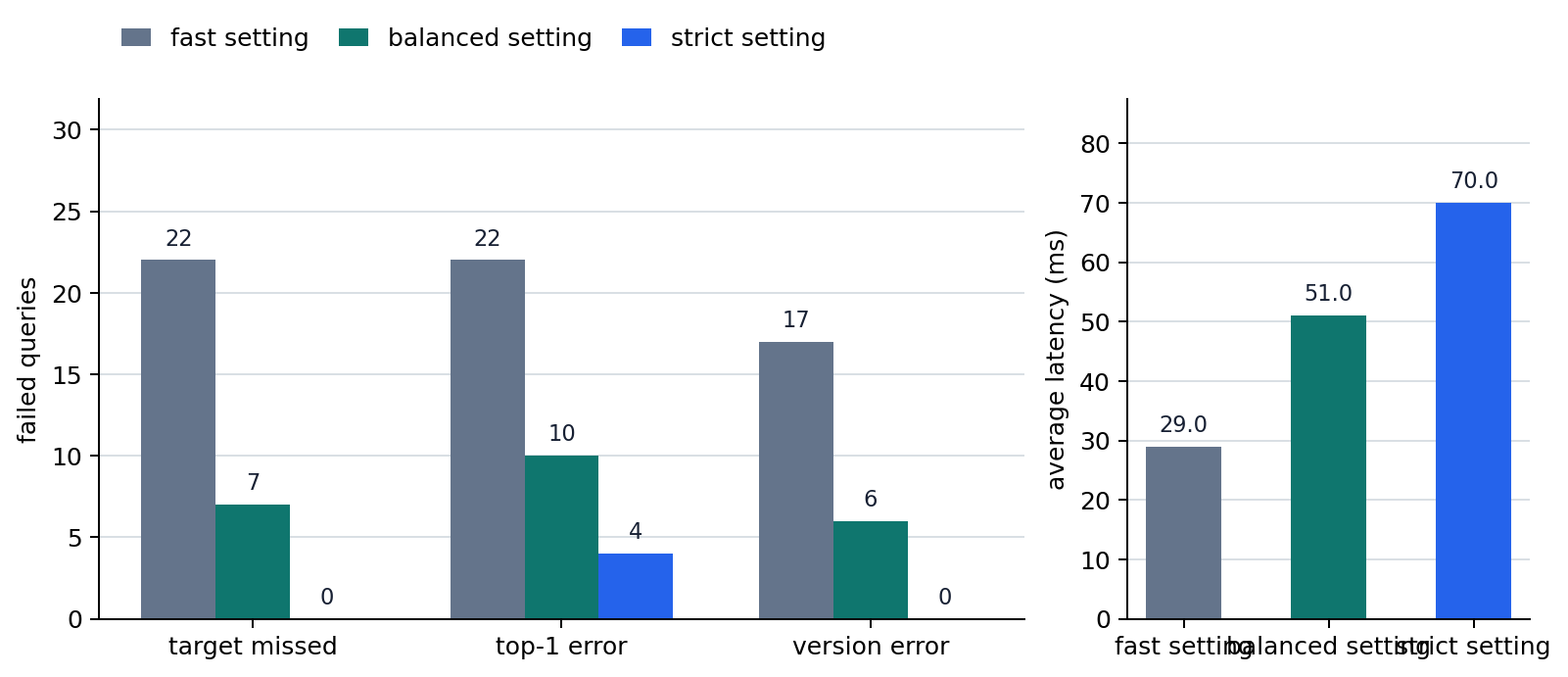
The first point to notice is that the fast setting has a low average latency substitute, but because it narrows the candidate budget to one, it fails to keep many 2.x target documents inside top-k. The balanced setting widens the candidate budget and reduces many misses, but for questions with more related documents, the target can move to rank 2 or still fall outside top-k. The strict setting turns on version_filter and widens the candidate budget, reducing target misses and version errors, but it does not automatically solve cases where a related v2 troubleshooting document comes first.
So this example should leave three results.
- A faster retrieval setting does not always mean better retrieval. We need to read latency together with
whether the needed document entered top-k,whether top-1 is right, andwhether a version filter is needed. - Even if
target_in_top_kpasses,top1_is_targetandtop1_version_okcan fail, so retrieval quality cannot be closed by one pass/fail item. - A single question can appear to pass by chance, but across many questions the differences among
hit_rate,top1_hit_rate, andversion_ok_ratebecome clearer.
The reader can directly adjust the example in these ways.
- Change
settings["fast"]["candidate_budget"]to 1, 2, and 4 and see how candidate count and missed documents change. - Change
settings["balanced"]["version_filter"]to"v2"and check whether old-version documents ranking first becomes less common. - Add custom quality indicators such as
recall_like_scoreortop2_version_mixtoinspect_search.
When speed-quality conflict is reread as operational judgment, it becomes clearer that we should not infer the cause from one metric.
| First visible signal | What to check immediately in the retrieval-index layer | Why this should come first |
|---|---|---|
| The response got faster, but answers often drift. | target_in_top_k, top1_hit_rate | Check whether the retrieval candidates themselves became unstable before blaming generation. |
| The correct answer enters top-k, but the final answer is wrong. | rank_of_target, chunk structure, generation-stage usage | Retrieval may have passed, but generation may have failed to use the key candidate. |
| Old-version documents with similar names often mix in. | top1_version_ok, metadata filters, version tags | The issue may be candidate validity and filter design, not speed. |
| Retrieval is weak only for certain question groups. | Hit rate by question type, chunk size, embedding expression | Data preparation or expression issues may matter more than the whole index. |
Speed and quality that move in the retrieval trade-off
The example above is not code that implements a real ANN system. It is the smallest retrieval experiment showing that faster retrieval and better candidate recovery are not the same goal. If we choose a fast setting by looking only at the latency substitute but the key paragraph falls out of candidates, the generation stage can be fluent while answer quality drops immediately. The important point here is not the absolute size of the numbers, but the need to read speed and quality together and choose which side matters more in retrieval. Operators also need to read top-k inclusion rate across many questions, not a single success case, to separate lucky success from actual stability.
In the chart, the fast setting has low average latency but many target misses and top-1 errors. The balanced setting reduces misses but leaves top-1 errors and version errors. The strict setting is slower but removes target misses and version errors, while some errors remain where a related v2 document ranks first. This is why index evaluation should read latency, target misses, top-1 errors, and version errors together.
What moves together when choosing an index
A vector search index is a structure for making retrieval faster. In operation, however, we cannot choose a good setting by reading latency alone. We also need to read whether the correct candidate stays alive inside top-k.
As vector search became widely used, retrieval again pulled us back toward the feel of data structures and algorithms. In LLM service contexts, however, the more important point is that this is not just a search-engine problem. It directly connects to generation quality and user experience.
This view matters because it:
- makes us read vector databases together with search structures, not as simple storage
- prepares us to see why retrieval metrics need to be evaluated separately in the later evaluation chapter
- reinforces the view that speed, cost, and quality are intertwined in service structure
Checklist
- You should be able to explain an index not only as
a structure that increases search speed, but asa search structure that affects speed and quality together. - You should be able to separate
is the correct answer included in top-kfromis the first result already correct. - You should understand that the next chapter is not a continuation of retrieval storage itself, but the stage where reduced candidates can connect to actual tool calls and external execution.
Sources and references
- Yu A. Malkov, D. A. Yashunin, Efficient and Robust Approximate Nearest Neighbor Search Using Hierarchical Navigable Small World Graphs, arXiv, 2016, accessed: 2026-07-19.
- Jeff Johnson, Matthijs Douze, Herve Jegou, Billion-scale similarity search with GPUs, arXiv, 2017, accessed: 2026-07-19.
- OpenAI, Vector embeddings, OpenAI API Docs, accessed: 2026-07-19.