P6-15.1 Agents That Change the Next Task Based on Intermediate Results
Section ID:
P6-15.1Version:v2026.07.31
Record an AI agent flow by separating goal, current_state, next_action, tool_result, observation, and updated_plan. This record distinguishes single-answer generation from a goal-directed flow that changes the next action based on intermediate results.
In P6-14.2, we saw that function calling represents tool use in a structured format. The question now grows larger. What should we call a workflow when tool calls do not end with one call, but must continue across several steps?
An AI agent is a work structure that receives a goal, continues the necessary subtasks, and creates a result by repeating tool use and observation.
Single Call and Goal Flow Difference
The issue to settle when understanding agents is distinguishing an execution structure that carries a goal across several steps from a single tool call. If the previous chapter's tool use asked what should we look up or execute once, an AI agent asks how to connect several tool calls and document-reading results in order, and when to stop or try again.
So it is safer to read an agent not as a broad product name, but as a goal flow whose next action changes after seeing intermediate results. If P6-14.2's function calling was about passing one execution request in a verifiable structure, an AI agent is about the order of several calls and reads, and about state management. P6-15.2 looks more closely at how the loop actually moves through planning, action, and observation.
The records to keep here are the step plan, intermediate observation notes, and next step. These records let us later reread why the next action changed and where a flow-level failure occurred. The next P6-15.2 section looks more concretely at where to stop and hand work over for human review.
Scenes that should be read as AI agent workflows
The distinction to fix here is not memorizing agent as the name of a new product, but separating scenes where several tools were used from scenes where the next action changes after seeing an intermediate result. A long answer does not automatically become an agent. Conversely, even if the output is short, the structure becomes more similar to an agent if the system checks search results and searches again, reads a tool result and chooses a different tool, or stops and hands off to a person after failure.
| First visible scene | Should it be read as an agent first? | Why this distinction matters |
|---|---|---|
| The answer is almost settled by one lookup or execution | Usually no | One tool use or one RAG step may be enough. |
| Search terms, tools, or next steps change after intermediate results | Yes | Choosing the next action itself becomes the problem. |
| Retry, stop, and handoff criteria must be decided after failure | Yes | Goal flow and state management become more important than one answer. |
If we keep this table in mind while reading the agent description, state, and examples below, it becomes easier to hold an AI agent as a goal flow in which the next-step choice keeps changing, not merely a system that uses many tools.
A structure that ties reading and execution into goal order
A prompt designs the input. RAG finds external documents and attaches them as answer evidence. Tool use calls an external function. Function calling organizes that call into a name and argument structure.
What becomes newly important in an AI agent is placing these elements inside a goal flow. Unlike one tool call, the next action changes after intermediate results, and the center shifts from one answer to a goal-centered workflow. So when reading an agent, we should first ask what did the system choose to do next after seeing the current state, rather than what did it execute once.
For example, if a goal continues through a flow such as:
- finding information
- choosing the needed tool
- reading the intermediate result
- changing the next action
- retrying after failure
- summarizing the final result
then it is more similar to an AI agent structure than to a simple one-shot request.
In other words, an agent centers on a workflow toward a goal more than on one response.
Chat Interface and Work-Coordination Structure Difference
Agents are often understood roughly as smarter chatbots. But a safer explanation is this.
An agent may have a conversational interface, but its core is not the conversation itself. Its core is an execution structure that carries work steps forward for a goal.
For example, an AI agent can:
- break a question down again
- search documents
- read files
- run tests
- see the cause of failure and try again
This kind of flow is more similar to a work-coordination structure than to a simple one-time answer.
Prompt, RAG, Tool Use, and Agent Levels
| Structure | What it handles first | Immediate judgment needed | How the result settles |
|---|---|---|---|
| Prompt | User input and instructions | How should we ask? | One model response |
| RAG | Documents and evidence | Which documents should be attached? | An answer with evidence |
| Tool use | External functions | Which function should be called? | Lookup value, calculation value, execution result |
| Function calling | Tool-call format | Which name and arguments should be passed? | A verifiable call request |
| Agent | Multistep state | What should happen next, and when should it stop? | A workflow that continues toward a goal |
The point of this table is that an AI agent is not simply a version with more tools attached. It changes choosing the next step into the central problem. So explaining agents is not a matter of listing more functions, but of regrouping the previous reading and execution pieces into goal-based ordering.
The minimum difference across Chapters 12 to 14 can be fixed again like this.
| Current level | Core question | What it leads to next |
|---|---|---|
| Tool use | What should we actually look up or execute? | What name and argument structure should carry the execution request? |
| Function calling | How do we make that execution request verifiable? | In what goal order should several calls continue? |
| Agent | How should several reads and executions continue as a goal flow? | What shared connection format and execution record should hold that flow? |
| MCP / harness | How should connections be exposed, and how should execution be recorded? | How should the record be read for evaluation and operation? |
If there is no state, the next action also shakes
To continue multistep work, the system must know the intermediate state.
For example:
- which documents have already been read
- which tool calls succeeded
- which error occurred
- what should happen next
Without this information, the agent can lose context at every step and repeat the same mistake.
So an AI agent is more similar to execution with state than to simple output generation.
Because of this, an agent explanation must answer why? by looking at the current step, previous result, and remaining goal together.
When a practical request goes beyond one answer
The point to distinguish is that returning one explanation and carrying several work steps through to completion are not the same problem. So scenes that need an agent usually reveal themselves through this question: must the next action be chosen again after seeing intermediate results?
- beyond a simple explanation
- gathering real materials
- using tools
- reorganizing results
- carrying the work through to the end
In other words, when a request does not settle with one answer and begins to continue through read -> execute -> check -> choose the next action, it is more accurate to read the scene as an AI agent structure than as a single response.
Examples include:
- development assistance
- research assistance
- document-processing automation
- customer-support workflows
These are places where AI agent structures stand out.
Operational complexity added by goal flows
This point must also be included.
Having an agent does not automatically solve:
- always making a correct plan
- avoiding infinite loops
- blocking all wrong tool calls
- optimizing cost and latency
So the result to keep checking is not only can it continue across several steps, but also whether the structure shows where it should stop, replan, and hand off to a person.
As steps increase:
- failure points increase
- more logs are needed
- approval and permission management become important
- evaluation and reproducibility can become harder
In other words, an agent expands capability while also greatly increasing operational complexity.
Basic Flow from Goal to Observation
flowchart TD
  A["goal"]
  B["choose next step"]
  C["use docs or tools"]
  D["observe result"]
  E["continue or stop"]

  A --> B
  B --> C
  C --> D
  D --> E
The key point of this diagram is that an AI agent is not a structure that ends once with question -> answer, but a repeated structure of goal -> step choice -> action -> observation.
Cases where intermediate observation changes behavior
Case 1. Coding agent
If a user asks, fix the login error, a person may expect one explanation of the cause or one piece of fix code. But a real coding agent finds related files, reads the error location, applies a patch, and runs tests again.
For example, if a test reveals a different authentication exception after the first fix, the agent should not stop there. It must continue to the next fix. Just as a person checks intermediate results, an agent also changes its next action after seeing a test failure or a new error message. If it ignores that observation, it may reduce one original error but finish while leaving a different regression behind.
The criterion changes from did it produce one fix to does it change the next action after seeing test results. This structure is called an agent because it is not one answer, but a workflow of read-fix-run-recheck. The result to check in this case is not whether one code change was produced, but whether the next action actually changes after seeing the test result.
| Step | Intermediate observation | What must actually change next |
|---|---|---|
| Read files | Location of authentication logic found | Which part to fix first |
| Apply patch | Code change completed | Which test to run |
| Run tests | New error, regression, failure log | Next patch direction and recheck order |
Case 2. Document-research agent
If a user asks, summarize the latest refund policy with evidence, it can feel as though one search will immediately settle the answer. But a document-research AI agent finds related notices and policy documents, checks document dates and evidence level as a person would during manual research, and if the evidence is not enough, changes the search terms or reads other sources.
If the first search result is last year's notice, the agent should not summarize it immediately. It should search again for the latest revised document. Conversely, if the latest notice is found but detailed conditions are in a separate policy PDF, the agent may need to open that PDF as well and reinforce the evidence. Otherwise, an answer can look cited while actually attaching outdated evidence or missing key conditions.
The criterion changes from did one search result appear to does it re-explore while checking dates and evidence level. Search, reading, summarization, source organization, and re-exploration continue under one goal, so the structure is more similar to an agent than to a simple search tool. The result to check in this case is whether the agent searches all the way to the latest document while checking dates and evidence level, instead of summarizing the first result immediately.
| Step | Intermediate observation | What must actually change next |
|---|---|---|
| First search | Last year's notice, insufficient source | Search terms and date filter |
| Read document | Missing detailed conditions | Additional PDF or original policy text |
| Pre-summary check | Source exists, but currency is uncertain | Whether to re-explore and reinforce cited evidence |
Case 3. Business-automation agent
A user may ask, find the urgent inquiries received today and check the owners' calendars. Even if the person expresses this request as one sentence, the actual system has to continue through mailbox lookup, urgency classification, owner search, calendar check, and result logging.
If three items are classified as urgent inquiries, the system may need to look up a different calendar for each owner, and if schedules conflict, it may have to reset priorities. Each step is an individual tool call, but the core is connecting those calls into one business goal and changing the next order based on intermediate results.
If the system pushes through the first fixed order without looking at intermediate results, it may handle a low-urgency item first or miss an owner schedule conflict. The criterion changes from does it call tools in sequence to does the actual order and priority change based on intermediate results. The result to check in this case is whether the workflow changes actual work order and priority based on intermediate results, instead of merely listing tool calls.
Expanded as a work structure, the cases can be read like this.
| Situation | Starting goal | What changes in the middle | Why it should be read as an agent |
|---|---|---|---|
| Coding assistance | Fix an error | Next patch direction based on test logs | It needs a retry loop, not one code suggestion |
| Document research | Organize the latest evidence | Search terms, date filters, reading priority | Old evidence can remain if it ends at the first search result |
| Business automation | Handle urgent inquiries | Priority, owner, schedule conflict handling | The order must keep changing after results from several systems |
Change based on observation, not number of tools
The easiest thing to miss when first reading agents is calling a system an agent just because it uses several tools. But the core is not the number of tools. It is whether the next action actually changes after seeing intermediate results.
The first question is simple. If something looks like a one-time answer that searches and ends, check whether a next choice really appears after the intermediate result. If several tools are used but the order is always fixed, check whether the order or next stage changes based on observation. When a failure occurs, check whether the system pushes the same order forward or changes to a different behavior such as searching again or retrying.
The criterion to learn first is not is this a system with many tools, but does the intermediate observation change the next-action choice. P6-15.2 looks more closely at detailed criteria for stopping and human review along with the plan-action-observation loop.
Seen again as a workflow structure, the same idea can be read like this.
flowchart LR
  A["goal"]
  B["current state"]
  C["choose next step"]
  D["act with docs or tools"]
  E["observe result"]
  F["update state"]

  A --> B --> C --> D --> E --> F
  F --> C
The key is not one answer, but a repetition that updates state and chooses the next action again.
Comparing model proposals with guard final actions
The goal of the example is not to implement a full agent framework. What we check here is that when observation results differ, the next action should also differ. Coding assistance, document research, and business automation are different tasks, but from the agent viewpoint they can all be reread as the problem of choosing the next action from the current state. A state with no related context, only stale context, insufficient evidence, failed execution, need for human review, or already attached sources requires a different next action.
The example below uses the observation-state CSV p6-14-1-agent-observation-states.csv. One row means the current state the agent saw in the middle of a task such as coding assistance, document research, or business automation. The CSV's model_observation_en column is the English observation sentence passed to the model, and found_context, current_context, detail_missing, conflict_found, action_failed, approval_needed, and sources_attached are state signals the application uses when checking the model proposal.
The key to check in the code is that the model reads the observation sentence and proposes a next action, but the application does not trust that proposal as is. It checks the proposal again with state signals. Before running the code, you need to install Ollama and pull a model. For example, run ollama pull qwen2.5:1.5b, then run the code while Ollama is running. To use a different model, change the environment variable with a value such as AIBOOK_OLLAMA_MODEL=model-name. The prompt and observation sentences sent to the model remain in English.
1 2 3 4 5 6 7 8 9 10 11 12 13 14 15 16 17 18 19 20 21 22 23 24 25 26 27 28 29 30 31 32 33 34 35 36 37 38 39 40 41 42 43 44 45 46 47 48 49 50 51 52 53 54 55 56 57 58 59 60 61 62 63 64 65 66 67 68 69 70 71 72 73 74 75 76 77 78 79 80 81 82 83 84 85 86 87 88 89 90 91 92 93 94 95 96 97 98 99 100 101 102 103 104 105 106 107 108 109 110 111 112 113 114 115 116 117 118 119 120 121 122 123 124 125 126 127 128 129 130 131 132 133 134 135 136 137 138 139 140 141 142 143 144 145 146 147 148 149 150 151 152 153 154 155 156 157 | |
The example output can be read like this.
The first thing to notice is that the model proposed a next action for every observation state. But guard_changed_model_action_count is also 10. For example, in verified_patch_with_notes, the model proposed attach_sources, but the state signal already says sources_attached, so the guard marked it as finish. In other words, an agent flow needs a structure that records model proposal, current state, and final next action together, rather than only the model proposal itself.
For the same reason, if evidence is not current, as in old_error_log or stale_policy_notice, the agent must search or read again. If execution itself fails, as in new_test_failure or calendar_api_failed, it should not push the same sequence forward, but retry with a different step. If a permission or approval boundary appears, as in security_sensitive_change or manager_approval_required, the agent should not continue alone and should hand the work over for human review.
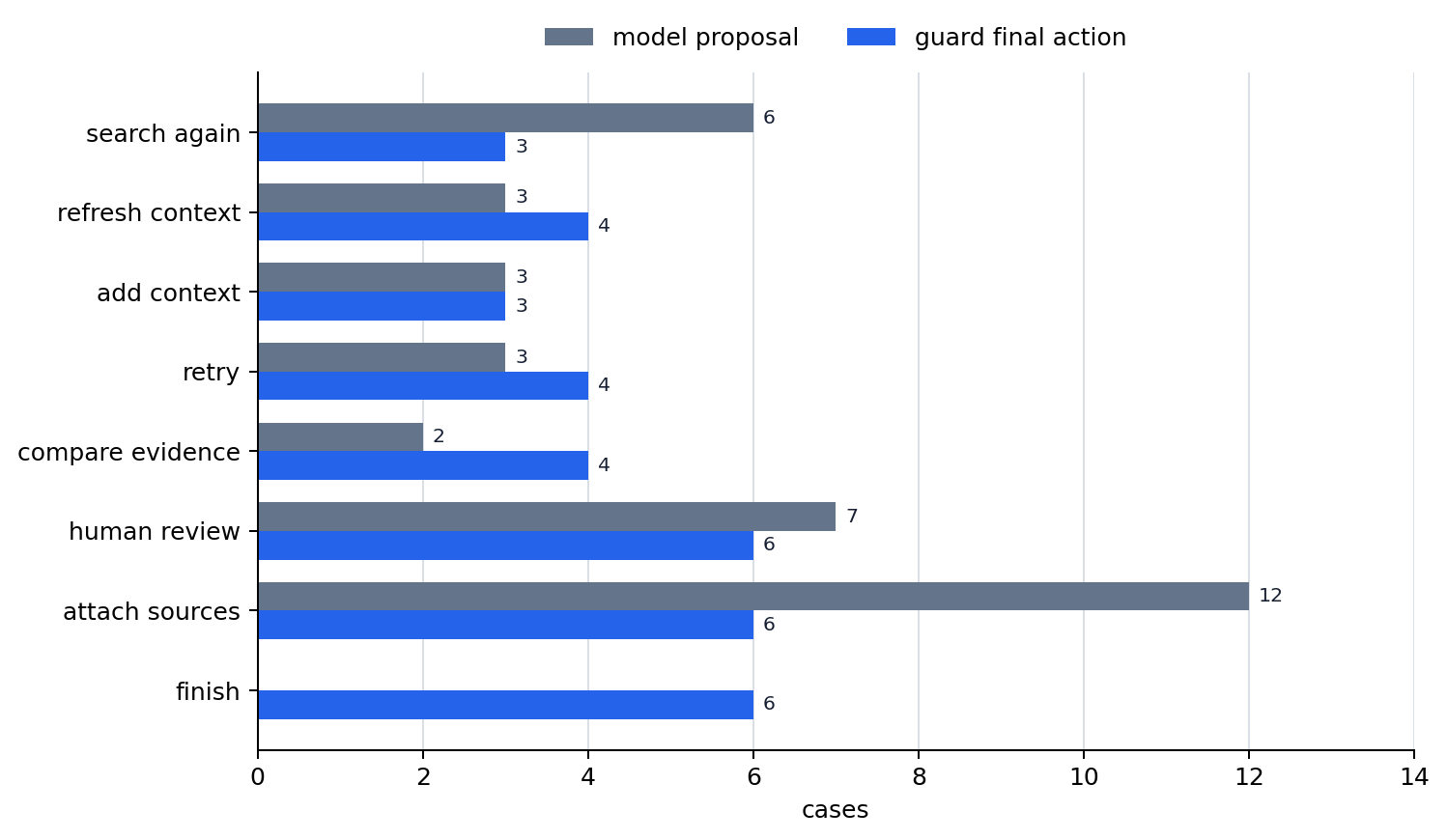
This chart shows the difference between model proposals and guard final actions. The model proposes attach_sources relatively often, but the guard checks state signals again and settles cases where evidence is already attached as finish. Conversely, when there are permission, failure, or conflict signals, the guard can fix the final action as human review, retry, or evidence comparison separately from the model proposal.
So the conclusion to read from this chart is not simply that the model was wrong. The chart shows that in an agent flow, the model proposes a next-action candidate and the application narrows that proposal again using current state and record criteria.
There are two results to check in this example.
- The model reads the observation sentence and proposes a next action, but that proposal must be checked again together with state signals.
- The core of an AI agent is not using many tools, but recording
a goal flow that chooses the next action again from the current state.
Readers can try these adjustments in the example.
- Change
current_contexttofalsein the CSV and see how the next action changes when stale evidence appears. - Change
action_failedtotrueand see whether the action becomes retry instead of continuing the same order. - Change
approval_neededtotrueand see whether the agent moves to human review instead of continuing. - Change
sources_attachedtotrueand see whether a case that no longer needs more work settles asfinish. - Change
AIBOOK_OLLAMA_MODELand see how the gap between model proposal and guard correction changes.
One more separation helps here. What the agent tries to solve directly is next-action choice and order adjustment. But how each call is represented, how permission boundaries are recorded, and how execution traces are left remain separate-level problems. Call-format validation was covered in P6-14.2, shared connection rules continue in P6-16.1, and execution records and reproducibility become more concrete in P6-16.2.
Next actions made by observation signals
The previous example is not code that implements a whole agent. It is a small inspection scene that shows how intermediate observation separates the next action. What we should read here is not the number of steps. Even under the same goal, the next action must differ when the current state differs: no related context, stale context, missing detailed evidence, failed execution, permission boundary, or sources already attached.
The core points to read from this example are these.
- Even if the goal is one, the current state can split into many forms.
- If the state changes, the next action must also change.
- The choice and reason must be recorded so the agent flow can be inspected again later.
Why several calls should be read as a goal flow
The core of an AI agent is not using many tools. It is making an execution flow that splits a goal into several steps and keeps choosing the next action again while looking at the current state.
The more important point is that answering well once and continuing work while seeing intermediate results are not the same problem. So an AI agent is better read not as a version with more tools attached, but as an execution flow that chooses the next action again while seeing multistep state.
This execution flow matters because it:
- places the immediately previous P6-14.1 tool use and P6-14.2 function calling inside
an execution structure that connects several steps, not onlyone call - prepares us to understand the plan, action, and observation loop of P6-15.2
- prepares us to see why P6-16.1 MCP, P6-16.2 harnesses, and P6-17.1 evaluation must be considered together
Checklist
- You should be able to explain an agent not as
a smarter chatbot, but asa work structure that connects several reads and executions into a goal flow. - If RAG, tool use, and function calling are reading, execution, and structuring respectively, you should be able to say that an AI agent is a higher-level flow centered on
choosing the next step. - You should know that an agent flow becomes more concrete as a repeated loop of planning, action, and observation.
Sources and Further Reading
- Shunyu Yao et al., ReAct: Synergizing Reasoning and Acting in Language Models, arXiv, 2022, accessed 2026-07-19.
- OpenAI, Agents SDK, OpenAI API Docs, accessed 2026-07-19.
- OpenAI, Using tools, OpenAI API Docs, accessed 2026-07-19.